BlinkGesture
Send keyboard commands handsfree by blinking twice / Double Blink gesture
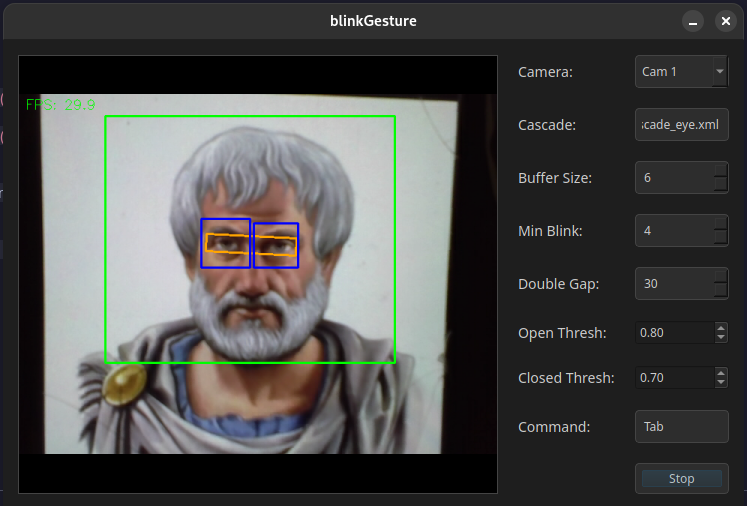
App Screenshot
Check out the older version
1. App Overview
It captures webcam video, locates and tracks eyes, extracts an aligned eye strip, enhances contrast, classifies eye state per frame, and detects single and double blinks. On a double‑blink, it issues a command via xdotool.
2. Data Flow
- Frame Capture: OpenCV
VideoCapture grabs frames at ~30 ms intervals.
- Detection: Every N frames, a Haar cascade (
haarcascade_eye.xml) locates eyes in the downscaled grayscale image.
- Tracking: Two KCF trackers maintain eye bounding boxes between detections; if tracking fails repeatedly, detection resets.
- Strip Extraction: Compute eye centers, angle, inter‑eye distance; define a rotated rectangle; apply affine warp to align eyes horizontally and crop a fixed‑size strip.
- CLAHE Preprocessing: Apply Contrast Limited Adaptive Histogram Equalization to the strip to normalize lighting.
- Patching & Classification: Slide a 64×64 window over the strip at scales 1.0 and 0.75, with stride 10. Each patch is converted to INT8, fed to the ONNX INT8 model, and softmaxed. Confident full‑scale results return early; smaller‑scale patches vote (open votes weighted higher).
- Temporal Logic: Maintain a buffer of recent open/closed states. Require a minimum number of closed frames before registering an open transition as a blink. Track blink timestamps to detect double‑blinks within a frame gap.
- Command Dispatch: When a double‑blink is detected, call
xdotool with the configured key or mouse click string.
3. Python Pipeline
3.1 Training (train_eye_cnn.py)
- Dataset: Images under
dataset/train/open eyes and dataset/train/close eyes.
- Preprocessing:
- Convert to grayscale.
- Resize to 64×64.
- Apply CLAHE (clipLimit=2.0, grid=8×8).
- ToTensor.
- Class Balancing: Downsample “closed eyes” to 80% to roughly match “open eyes”.
- Model Architecture:
EyeCNN(
  Conv2d(1→16, 3×3, pad1) → ReLU → BatchNorm
  Conv2d(16→32, 3×3, pad1) → ReLU → BatchNorm
  MaxPool2d(2)
  Conv2d(32→64, 3×3, pad1) → ReLU → BatchNorm
  MaxPool2d(2)
  AdaptiveAvgPool2d(4×4)
  Flatten
  Linear(64*4*4→128) → ReLU → Dropout(0.3)
  Linear(128→2)
)
- Loss & Optimization:
- CrossEntropy with class weights [1.0, 1.8].
- Label smoothing 0.15.
- Adam optimizer (lr=1e-3, weight_decay=1e-4).
- Train for 7 epochs; save best on validation accuracy.
3.2 Export to ONNX (export_cnn_to_onnx.py)
- Load
eye_cnn.pth into EyeCNN model.
- Dummy input 1×1×64×64 on CPU or CUDA.
- torch.onnx.export →
eye_cnn.onnx (opset 11, dynamic batch).
3.3 Quantization to INT8 (quantize_to_int8.py)
- Use calibration subset (256 images, balanced open/closed) with CLAHE preprocessing.
- quantize_static →
eye_cnn_quant_tmp.onnx (QOperator, QInt8).
- Patch graph:
- Remove initializer inputs, replace input tensor type to INT8 with shape fallback dims.
- Add scale (1/255.0) and zero_point (0) initializers.
- Remove QuantizeLinear nodes immediately after input.
- Clean duplicate initializers.
- Save final
eye_cnn_int8.onnx.
3.4 Evaluation (confusionmatrix.py)
- Load
eye_cnn_int8.onnx via ONNX Runtime.
- For each test image in
dataset/test/{open eyes, close eyes}:
- Grayscale → CLAHE → Resize → Normalize → Quantize to int8 → reshape to (1,1,64,64).
- Run session.run; softmax; if max(prob) ≥ 0.7, record prediction.
- Print classification report and confusion matrix (scikit-learn).
4. C++ Runtime
- blink_detector.cpp:
- Loads
eye_cnn_int8.onnx with ONNX Runtime C++.
processStrip(): CLAHE + patch scanning logic + ONNX inference + thresholds → state.- Temporal buffer for blink detection; flags double‑blink.
- eyestrip.cpp: Extraction and affine alignment of eye strip; history‑based smoothing; FPS overlay.
- command_dispatcher.cpp: Parses command string; maps to
xdotool key or click commands; executes via QProcess.
- main.cpp / gui.cpp: Qt GUI for selecting camera, cascade, parameters; timer loop calls strip + detector; displays debug image.
5. Build & Dependencies
cmake .. \
  -DUSE_SYSTEM_OPENCV=ON \
  -DUSE_SYSTEM_ONNX=ON
make -j
- Qt5 Widgets
- OpenCV: core, imgproc, videoio, tracking, objdetect, imgcodecs
- ONNX Runtime C++ API
- xdotool (Linux utility)
- Haar cascade XML file in working directory
6. Pros & Cons
Pros
- Fast on‑CPU inference via INT8 quantization.
- Lighting invariance through CLAHE.
- Tracker/detector hybrid reduces jitter.
Cons
- Haar cascades can fail on extreme poses or occlusions.
- Patch scanning is CPU-heavy.
7. Future Additions
- Change sliding window CNN to a single pass CNN.
- GPU support using CUDA
- Windows support.
←
Comments